What is Apache Parquet?
Apache Parquet Format for Inspection Data

Definition and Columnar Storage Model
Apache Parquet is a free, open-source, column-oriented binary file format designed from the ground up for efficient data storage and retrieval in analytical workloads. Originally developed as a collaborative effort between Twitter and Cloudera within the Apache Hadoop ecosystem, Parquet has since become the de facto standard for analytical data storage across the entire data engineering landscape. Every major data processing engine, Apache Spark, DuckDB, ClickHouse, Presto, Trino, Snowflake, Google BigQuery, Amazon Redshift, and Databricks, provides native support for reading and writing Parquet files. The format was designed to address the fundamental performance limitations of row-oriented formats when processing analytical queries that scan large volumes of data but reference only a subset of columns or rows.
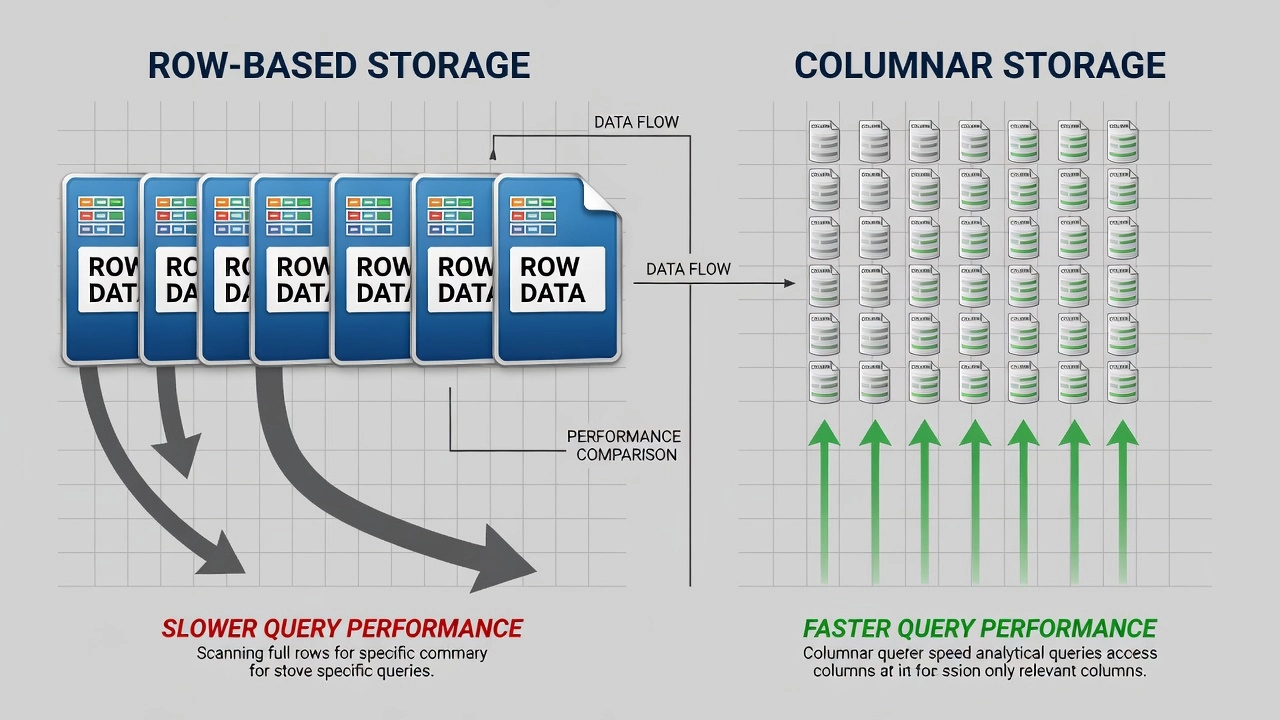
Columnar Storage vs. Row-Oriented Storage. The defining architectural characteristic of Parquet is its columnar storage model. In a traditional row-oriented format like CSV or JSON, all fields belonging to each record are stored contiguously on disk. For a pavement inspection dataset with 100 attributes per surveyed point, coordinates, surface condition ratings, distress measurements, imagery metadata, CSV stores all 100 values for row 1, followed by all 100 values for row 2, and so on. When a query requests only two attributes such as crack width and GPS latitude, the storage engine must read every single attribute for every row from disk, parse the entire dataset, extract the two requested columns, and discard the remaining 98 columns. This results in massive I/O waste, approximately 98% of data read from disk is immediately discarded.
Parquet reverses this model entirely. Within each row group (a horizontal partition of the dataset containing a contiguous block of rows), data is stored by column rather than by row. All values for the latitude column are stored contiguously in one column chunk, all values for crack width in another column chunk, and so on. A query requesting only latitude and crack width reads only those two column chunks from disk, reducing I/O by the same 98% that is wasted in row-oriented formats. This columnar layout is the foundation of Parquet’s performance advantage for analytical queries.
Internal File Architecture. A Parquet file follows a strict hierarchical structure with three nested levels of organization: row groups, column chunks, and pages. Understanding this hierarchy is essential for optimizing Parquet performance in inspection data pipelines.
The outermost level is the row group, which partitions the dataset horizontally into contiguous blocks of rows. Each row group is designed to be independently readable and processable, enabling parallel execution across multiple CPU cores or distributed cluster workers. A typical row group contains between 64,000 and 1,000,000 rows, with an uncompressed size target of 64 MB to 1 GB depending on the workload. For TarmacView inspection data, row groups of approximately 256 MB uncompressed provide an optimal balance between parallelization granularity and metadata overhead. Larger row groups reduce the number of metadata entries in the file footer but limit parallelism, smaller row groups increase metadata overhead but enable finer-grained data skipping.
Within each row group, data is divided by column into column chunks. Each column chunk stores all values for a single column across all rows in that row group. Because all values in a column chunk share the same data type and often exhibit similar statistical properties, such as low cardinality for categorical distress classifications or monotonic ordering for timestamps, column chunks can be compressed and encoded far more efficiently than mixed-type row data. Column chunks are also where Parquet’s statistical metadata is computed: each column chunk optionally stores the minimum value, maximum value, and null count for that column within the chunk. These statistics enable predicate pushdown, where query engines skip entire column chunks whose value ranges do not overlap with filter conditions.
Each column chunk is subdivided into pages, the smallest indivisible unit of storage and the level at which compression and encoding are applied. The default page size is approximately 1 MB uncompressed. A column chunk typically consists of multiple data pages containing the encoded column values, optionally preceded by a dictionary page that maps unique values to integer indices for dictionary encoding. Parquet defines several page types including DATA_PAGE (the original v1 format), DATA_PAGE_V2 (an improved format that stores repetition and definition levels uncompressed for faster skipping of null and nested values), and DICTIONARY_PAGE (containing the dictionary mapping for dictionary-encoded columns).
File Footer and Metadata. The file footer is a critical component of every Parquet file. Located at the end of the file, the footer contains the complete file metadata serialized using Apache Thrift’s TCompactProtocol, a compact binary serialization format optimized for schema-on-read workloads. The footer metadata includes the file schema (column names, data types, and nested structure definitions), the number of rows, the file version, the list of row groups with their column chunk locations and sizes, per-column-chunk statistics (min, max, null count), the compression codec used for each column, and optional key-value metadata for application-specific information. Because the footer is small, typically a few kilobytes to a few hundred kilobytes for files with many row groups, query engines can read it rapidly and plan their data access strategy before reading any data pages.
Magic Bytes and File Identification. Every valid Parquet file begins and ends with the 4-byte magic number PAR1 (hexadecimal: 50 41 52 31). The magic bytes at the start identify the file format to readers, while the magic bytes at the end confirm file integrity and provide an anchor for locating the footer metadata. To read a Parquet file, a query engine follows this canonical algorithm: seek to end of file minus 8 bytes, read the 4-byte magic to confirm PAR1 format, read the preceding 4 bytes as a little-endian 32-bit integer representing the footer metadata length, seek backward by that length, read and deserialize the Thrift-encoded FileMetaData, parse the schema, locate the desired column chunks by their file offsets, and read only the required pages.
Advantages of Parquet for Inspection Data
Compression Ratios. Parquet’s columnar storage model inherently produces dramatically smaller file sizes than row-oriented formats, even before applying a compression codec. This size reduction comes from two sources: columnar encoding techniques that exploit per-column data characteristics, and optional compression codecs applied at the page level. Benchmark studies on real-world datasets consistently show that uncompressed Parquet is approximately 25% to 32% the size of equivalent CSV files. Adding a compression codec such as Snappy or Zstd reduces file size further to 8% to 18% of CSV size, representing a 5x to 12x storage reduction.
For inspection data, this compression is particularly beneficial because the datasets combine high-precision floating-point coordinates (which delta-encode extremely well), categorical distress classifications (which benefit from dictionary encoding), and timestamps (which compress efficiently via delta encoding). A complete runway pavement survey generating 50 million data points with 80 attributes per point produces approximately 40 GB as raw CSV. The same data stored as Parquet with Zstd compression occupies approximately 3 GB to 5 GB, a storage reduction of 8x to 12x. For airport operators conducting quarterly surveys across multiple runways, taxiways, and apron areas, this translates directly into reduced storage infrastructure costs, faster data transfer times, and more efficient cloud storage usage.
Predicate Pushdown. Predicate pushdown is the single most impactful performance optimization enabled by Parquet’s columnar storage and per-chunk statistics. When a query includes a WHERE clause, such as WHERE pci < 40 AND survey_date >= '2024-01-01', the query engine first reads the file footer containing per-column-chunk statistics for the filtered columns. For each row group, the engine compares the filter condition against the stored minimum and maximum values. Row groups whose statistics range does not overlap with the filter condition are skipped entirely, consuming zero I/O.
Consider a TarmacView inspection archive containing five years of quarterly runway surveys, organized into 200 row groups per year across 1000 total row groups. A query filtering for survey_date >= '2024-06-01' compares the filter date against the stored min and max timestamps for each row group. Only the row groups corresponding to mid-2024 and later surveys overlap the filter, approximately 50 to 100 row groups out of 1000, or 5% to 10% of the total data. The remaining 900 to 950 row groups are skipped without being read. The query reads only 5% to 10% of the file data, delivering a 10x to 20x performance improvement over a full scan. Combined with column pruning, the effective I/O savings can exceed 100x for selective queries on wide datasets.
Schema Evolution. Parquet supports schema evolution, the ability to add, remove, or modify columns over time without rewriting existing files. This is critical for long-running inspection programs where data collection requirements evolve. A runway inspection program that initially records only surface distress ratings may later add crack classification, texture measurements, or imagery metadata as the program matures. With schema evolution, new Parquet files written with the expanded schema coexist seamlessly with older files using the original schema. Query engines reading the dataset see a merged schema with null values populated for columns that did not exist in older files. Parquet also supports adding columns with default values, renaming columns via column alias metadata, and backward-compatible type promotions such as int32 to int64.
Column Pruning (Projection Pushdown). Column pruning is the practice of reading only the columns referenced in a query from disk. Because Parquet stores columns in separate column chunks within each row group, the query engine reads only the column chunks for columns appearing in the SELECT clause. For a TarmacView inspection file with 100 attributes, a query selecting latitude, longitude, pci reads only three column chunks, approximately 3% of the total file data. With row-oriented formats, the same query must read 100% of the data and discard 97% in memory. Column pruning is automatic in all Parquet-compatible query engines and requires no explicit configuration. The performance benefit scales linearly with the number of columns in the dataset: the more attributes collected per surveyed point, the greater the savings from column pruning.
Self-Describing Format. Parquet files are fully self-describing, the schema, compression codec, encoding, statistics, and application metadata are all embedded within the file itself. No external schema registry, data dictionary, or configuration file is needed to read a Parquet file. This property simplifies data sharing, archiving, and long-term preservation. A Parquet file written five years ago with an unknown schema can be read by modern software without external documentation. The self-describing nature also enables schema validation at read time, catching data type mismatches and structural inconsistencies before they propagate through analysis pipelines.
Splittable and Parallel-Read Capable. Parquet row groups are independently readable, enabling parallel processing across multiple CPU cores, distributed cluster nodes, or concurrent cloud storage connections. A single large Parquet file can be split into its constituent row groups and processed simultaneously, with each worker handling a subset of row groups. This property is essential for distributed processing frameworks such as Apache Spark, which assigns different row groups to different executor tasks, and for multithreaded analysis libraries such as Polars, which reads multiple row groups in parallel within a single process. For TarmacView inspection data pipelines processing terabytes of survey data, parallel row group reading reduces processing time from hours to minutes.
Parquet vs. CSV and JSON for Inspection Data
The choice of data format fundamentally impacts every aspect of an inspection data pipeline: storage costs, query performance, data integrity, and long-term maintainability. Parquet, CSV, and JSON each have distinct characteristics that make them suitable for different use cases within the inspection data ecosystem.
Storage Efficiency. CSV files store data as plain text with comma separators and no compression. A single floating-point number such as 14.732859 is stored as 9 bytes of ASCII text regardless of its precision requirements. JSON is even more verbose, adding structural characters such as braces, brackets, quotes, and colons that can double or triple the file size compared to CSV for the same data. Parquet stores the same value as 4 bytes or 8 bytes of binary data depending on whether 32-bit or 64-bit precision is used. When combined with dictionary encoding for categorical columns, which replace repeated string values with compact integer indices, Parquet achieves storage reductions of 5x to 20x compared to CSV and 8x to 30x compared to JSON.
| Feature | Parquet | CSV | JSON |
|---|---|---|---|
| Storage model | Columnar binary | Row-oriented text | Row-oriented text (nested) |
| File size (1M inspection rows, 80 cols) | 50–200 MB | 500 MB–2 GB | 800 MB–3 GB |
| Built-in compression | Yes (encoding + codec) | None (external only) | None (external only) |
| Read: 2 columns of 80 | ~2.5% of file I/O | 100% of file I/O | 100% of file I/O |
| Schema | Self-describing, typed | None (inferred) | Implicit, untyped |
| Human-readable | No (binary) | Yes | Yes |
| Nested data support | Native (struct, list, map) | Not supported | Native |
| Query speed (analytics) | 10x–100x faster than CSV | Baseline | Slower than CSV |
| Write speed | Slower (encoding overhead) | Fast | Fast |
| Ecosystem support | Spark, DuckDB, BigQuery, Snowflake | All tools | All tools |
Query Performance. The performance difference between Parquet and row-oriented formats becomes more pronounced as dataset size and query complexity increase. For simple count queries on small datasets (fewer than 100,000 rows), CSV can perform competitively with Parquet when using optimized CSV readers. However, for typical inspection data workloads involving filtering, aggregation, and multi-column analysis on datasets ranging from millions to billions of rows, Parquet outperforms CSV by factors of 10x to 100x. The performance advantage comes from three sources: reduced I/O through column pruning (reading only needed columns), reduced I/O through predicate pushdown (skipping irrelevant row groups), and faster decompression and decoding of compressed binary data compared to parsing plain text.
Schema Integrity. CSV has no built-in schema. A column containing integer values in one file may contain string values or empty fields in another, with no mechanism for detecting or reporting the inconsistency. Data type inference in CSV readers is heuristic and can produce incorrect results, for example, interpreting a ZIP code such as 02134 as the integer 2134 after stripping the leading zero. JSON has an implicit schema but no type enforcement, the same field may be a string in one record and a number in the next. Parquet enforces a strict, explicit schema at the file level. Every value in a column must match the declared data type, and schema validation occurs at write time. This type safety is critical for inspection data where data integrity is paramount for safety-critical infrastructure decisions.
When to Use Each Format. CSV remains useful for small datasets that must be human-readable, for data interchange between systems that lack Parquet support, and for workflows where simplicity of generation is more important than query performance. JSON is appropriate for semi-structured data with variable schema, for API payloads, and for logs where nested structure is essential. Parquet is the correct choice for any inspection dataset exceeding approximately 100 MB, for all analytical query workloads, for long-term data archival, and for any pipeline where query performance and storage efficiency are priorities. In the TarmacView architecture, raw survey data may be initially ingested as JSON or CSV from sensor systems, but all analytical data products, results, tiles, assessments, are stored exclusively in Parquet.
Reading and Writing Parquet in Python
Python provides three primary libraries for Parquet processing, PyArrow, Pandas, and Polars, each with distinct strengths for inspection data analysis. The choice of library depends on the specific requirements of the workflow: pipeline throughput, interactive analysis speed, memory constraints, and integration with existing tooling.
PyArrow. PyArrow is the Python binding for the Apache Arrow C++ library and provides the most complete, low-level API for Parquet operations. It offers fine-grained control over all Parquet parameters including row group size, page size, compression codec, dictionary encoding thresholds, and statistics collection. The pyarrow.parquet module provides read_table() and write_table() functions for core operations.
import pyarrow.parquet as pq
import pyarrow as pa

# Read with column pruning and predicate pushdown
table = pq.read_table(
    'survey_results.parquet',
    columns=['latitude', 'longitude', 'pci', 'crack_width'],
    filters=[('pci', '<', 40), ('survey_date', '>=', '2024-01-01')]
)

# Write with fine-grained control
pq.write_table(
    table,
    'filtered_results.parquet',
    row_group_size=100000,
    compression='zstd',
    compression_level=3,
    use_dictionary=True,
    write_statistics=True,
    data_page_size=1048576  # 1 MB default page size
)
The columns parameter enables explicit column pruning, reading only the specified columns from the file. The filters parameter enables predicate pushdown, accepting a list of filter expressions in DNF (Disjunctive Normal Form) format. PyArrow evaluates these filters against per-chunk statistics before reading any data pages. For partitioned datasets, common in TarmacView where data is organized by survey date and runway section, pq.ParquetDataset() provides automatic partition discovery with pushdown of both partition filters and column statistics.
Pandas. Pandas provides a simpler, higher-level API for Parquet operations through pd.read_parquet() and df.to_parquet(). The library delegates the underlying Parquet implementation to either PyArrow (the default for newer Pandas versions) or fastparquet. Pandas is ideal for interactive analysis, Jupyter notebook workflows, and quick data exploration where simplicity is valued over fine-grained control.
import pandas as pd

# Read Parquet file
df = pd.read_parquet(
    'assessment.parquet',
    engine='pyarrow',
    columns=['runway_id', 'section', 'pci', 'distress_type']
)

# Write Parquet file
df.to_parquet(
    'processed_assessment.parquet',
    engine='pyarrow',
    compression='zstd',
    index=False
)
Pandas reads the entire Parquet file into a DataFrame in memory. This is appropriate for datasets that fit within available RAM, up to approximately 10 GB to 50 GB depending on hardware. For larger datasets, Pandas may require chunked reading or out-of-core processing strategies. The engine parameter defaults to PyArrow in recent Pandas versions but can be set to fastparquet for a lighter dependency footprint.
Polars. Polars is a DataFrame library built natively on Apache Arrow with a Rust-based engine that provides the fastest Parquet read performance among Python libraries, typically 3x to 10x faster than Pandas. Polars achieves this through aggressive multithreading, cache-efficient data layouts, and lazy query optimization that postpones execution until the complete query plan is known.
import polars as pl

# Lazy reading with automatic predicate pushdown and column pruning
lazy_df = pl.scan_parquet('survey_results.parquet')

# Build query plan
query = (lazy_df
    .filter(pl.col('pci') < 40)
    .filter(pl.col('survey_date') >= pl.date(2024, 1, 1))
    .select(['latitude', 'longitude', 'pci', 'crack_width'])
    .group_by('runway_section')
    .agg(pl.mean('pci'))
)

# Execute query
result = query.collect()

# Write Parquet
pl.DataFrame(result).write_parquet('section_summary.parquet', compression='zstd')
The scan_parquet() method creates a lazy computation graph that captures the full query plan, filters, selections, aggregations, before any data is read from disk. When collect() is called, Polars pushes down all applicable filters to the Parquet reader, skipping entire row groups via statistics and reading only the required columns from the remaining row groups. This lazy optimization can reduce data reading by 95% or more compared to eager reading of the entire file followed by in-memory filtering.
Performance Comparison. Benchmark results from real-world data processing workloads show the relative performance of the three libraries:
| Operation | Pandas (pyarrow engine) | Polars | PyArrow |
|---|---|---|---|
| Read 10 GB Parquet, full scan | ~60 s | ~15–20 s | ~25 s |
| Filter + aggregation on 10 GB | ~45 s | ~8–12 s | ~15 s |
| Write 10 GB Parquet with Zstd | ~80 s | ~30 s | ~40 s |
| Column pruning + filter pushdown | ~50 s | ~3–5 s | ~10 s |
Polars shows the strongest advantage for selective queries involving column pruning and predicate pushdown because its lazy optimizer eliminates unnecessary I/O before execution begins. For write-heavy operations in data pipeline contexts, PyArrow provides the most reliable performance with the broadest feature set.
TarmacView Parquet Schema
TarmacView organizes inspection analysis results into a family of Parquet files, each with a dedicated schema optimized for specific query patterns and use cases. This schema design follows Parquet best practices including appropriate data type selection, column statistics for predicate pushdown, and partition organization for time-range and spatial queries.
results.parquet. The primary inspection output file stores one row per surveyed position along the runway or pavement surface. The schema includes accurate GPS coordinates with sub-meter precision using the WGS84 datum, the survey timestamp with timezone information for correlating with weather and operational data, and comprehensive pavement condition measurements. Individual distress columns store crack width in millimeters, crack length in meters, spalling area in square meters, raveling severity on a categorical scale, and surface texture metrics including mean profile depth. The PCI calculation fields store the computed Pavement Condition Index value according to ASTM D5340 methodology, the deduct values for each distress type, and the final PCI rating classification. Quality control columns record the GPS accuracy estimate in meters, the processing confidence score, and quality flags indicating potential data anomalies. Each row is uniquely identified by a survey run identifier and a sequential point index, enabling precise spatial and temporal referencing of every measurement.
tiles.parquet. The tile-based analysis file partitions the pavement surface into a regular grid with configurable tile size, defaulting to 1 meter by 1 meter for detailed surveys and 5 meters by 5 meters for rapid assessments. Each row represents a single tile with its geospatial bounding box coordinates, the tile centroid latitude and longitude, and aggregated statistics computed from all survey points falling within the tile. Aggregated fields include the mean, median, minimum, and maximum PCI values within the tile, the dominant distress type determined by the highest deduct value, the distress density as a percentage of tile area affected, and the count of data points contributing to the tile statistics. The tile schema also stores the tile-level PCI rating classification and a recommended maintenance action based on threshold analysis. Tile-based storage enables rapid spatial queries and visualization workflows where displaying every individual survey point is unnecessary and computationally expensive.
assessment.parquet. The final condition assessment file stores the section-level evaluation with one row per homogeneous pavement section per survey campaign. Each section is defined by its runway or taxiway identifier, start and end station coordinates, and section length. The assessment schema includes the computed section PCI following ASTM D5340 methodology with all deduct value calculations, the ICAO Annex 14 surface condition rating for international compliance reporting, individual distress type densities expressed as a percentage of section area, the corrected deduct values for each distress, and the final PCI. Maintenance recommendation fields store the computed priority ranking based on PCI thresholds, the recommended treatment type such as crack sealing, overlay, or reconstruction, and the estimated treatment urgency. The assessment file also records metadata about the survey including the survey vehicle identifier, the sensor configuration, the analysis software version, and the data processing pipeline version for full traceability.
telemetry.parquet. The survey vehicle telemetry stream file records time-series sensor data collected during the inspection run. Each row represents a telemetry reading at a specific timestamp including GPS time, vehicle speed in kilometers per hour, heading in degrees from true north, longitudinal and lateral acceleration in meters per second squared, altitude from GPS, and number of satellites used for GPS fix. Sensor-specific columns record the status of each imaging and measurement sensor including camera frame rate, laser line scanner status, and inertial measurement unit orientation angles. The telemetry file enables post-processing quality analysis, such as detecting survey runs conducted at excessive speed that may compromise data quality, identifying areas where the survey vehicle deviated from the prescribed path, and correlating pavement condition measurements with vehicle dynamics for research and optimization purposes.
File Partitioning and Organization. TarmacView Parquet files are partitioned by survey date and runway section to optimize time-range and spatial queries. The partition directory structure follows the pattern survey_date=YYYY-MM-DD/runway_id=RWY09/section=SECTION_A/. Partition pruning allows queries filtering on survey date or runway section to read only the relevant directories, skipping all other partitions. Within each partition, Parquet row groups are sized to approximately 256 MB uncompressed, balancing parallelization granularity against metadata overhead. All files use Zstd compression at level 3 with dictionary encoding enabled for categorical columns and delta encoding enabled for monotonic fields such as station coordinates.
Parquet for Large Video Survey Data
Airfield pavement inspection surveys produce exceptionally large datasets that push the limits of traditional data storage approaches. A single runway survey at 1 mm resolution using a vehicle-mounted camera system can generate 500 GB to 2 TB of raw imagery data per kilometer of pavement, with corresponding measurement data from laser profilers, inertial sensors, and GPS receivers producing additional structured data streams. Parquet plays a central role in managing the structured measurement component of this data, the high-dimensional, multivariate tabular data that describes pavement condition at every surveyed point.
Managing High-Dimensional Inspection Data. Modern pavement inspection systems collect dozens to hundreds of attributes per surveyed point. A typical survey vehicle sensor suite includes multiple high-resolution cameras providing visual imagery at sub-millimeter resolution, laser line scanners producing 3D surface profiles with micron-level vertical accuracy, infrared thermography sensors measuring surface temperature for delamination detection, ground-penetrating radar for subsurface layer assessment, inertial measurement units for precise positioning and orientation, and GPS receivers for absolute georeferencing. Each sensor produces structured measurements that are spatially and temporally correlated. The combined dataset for a single survey campaign across a major international airport can exceed 100 billion data points when considering all sensor channels at full sampling rate.
Parquet enables efficient storage and querying of these high-dimensional datasets through its combination of columnar storage for dense attribute sets, dictionary encoding for repetitive categorical fields, delta encoding for monotonically increasing timestamps and station coordinates, and run-length encoding for sequences of identical values common in distress classification fields. A typical survey point record with 80 attributes occupies approximately 70 bytes in Parquet with Zstd compression, compared to approximately 400 bytes as uncompressed CSV and approximately 800 bytes as JSON. For 100 billion survey points, this represents a storage difference of 7 TB for Parquet versus 40 TB for CSV versus 80 TB for JSON.
Temporal and Spatial Query Patterns. Inspection data queries follow characteristic patterns that Parquet’s architecture serves well. Time-range queries such as “Show all survey data between March and September 2024” benefit from Parquet’s partition pruning when files are organized by survey date, and from predicate pushdown on the timestamp column within files. Spatial queries such as “Find all distresses within 100 meters of the runway threshold” benefit from delta-encoded station coordinates that compress efficiently and enable fast sequential scanning of contiguous spatial extents. Multi-attribute queries such as “Locate areas with PCI below 40 and crack width exceeding 3 mm” benefit from column pruning that reads only the three relevant columns, PCI, crack width, and coordinates, from the full attribute set.
Streaming and Incremental Processing. Large video survey data often requires incremental processing where raw sensor data is ingested, processed, and written to Parquet in stages. Parquet supports streaming writes through its row group architecture: data can be accumulated in memory until a row group reaches the target size, then flushed to disk. This enables processing pipelines that consume live sensor feeds during survey runs and produce Parquet files incrementally without requiring the entire dataset to be held in memory. TarmacView’s processing pipeline implements this pattern, writing survey results to Parquet in near-real-time as the survey vehicle traverses the runway.
Querying Parquet with Filter Pushdown and Column Pruning
The combination of filter pushdown and column pruning is the primary mechanism by which Parquet achieves its performance advantage over row-oriented formats. Understanding how these optimizations work enables inspection data analysts and pipeline developers to structure queries for maximum efficiency.
Filter Pushdown Mechanism. When a query engine reads a Parquet file, its first operation is to read the file footer containing the schema definition and the list of row groups with their per-column-chunk statistics. For each column referenced in WHERE clauses, the engine extracts the stored minimum and maximum values from each column chunk’s statistics. The engine then evaluates each filter condition against each column chunk’s min-max range using the following logic: if the filter condition requires values greater than X, and the column chunk’s maximum value is less than or equal to X, then the chunk contains no matching rows and can be skipped entirely. Similarly, if the filter condition requires values less than Y, and the column chunk’s minimum value is greater than or equal to Y, the chunk can be skipped. The engine iterates through all column chunks in parallel, building a mask of row groups that must be read and row groups that can be skipped.
Consider a concrete example from TarmacView inspection data. An analyst queries: “Find all sections with PCI below 40 surveyed after June 1, 2024.” The engine reads the footer and examines the statistics for the pci and survey_date column chunks across all row groups. A row group covering survey dates from January to March 2024 has a survey_date maximum of March 31, 2024, this is below the filter threshold of June 1, 2024, so the entire row group is skipped. Another row group covering PCI values from 45 to 95 has a pci minimum of 45, this is above the filter threshold of 40, so this row group is also skipped. After evaluating all row groups, the engine identifies that only row groups with overlapping min-max ranges contain potentially matching rows, typically 1% to 10% of the total data volume for selective queries on large archives.
Column Pruning in Practice. Column pruning operates at the same level as filter pushdown but addresses a different dimension of I/O reduction. While filter pushdown reduces the number of rows read by skipping entire row groups, column pruning reduces the number of columns read by selecting only the column chunks for referenced columns. The two optimizations compound: filter pushdown eliminates irrelevant row groups entirely, and column pruning reads only the needed columns from the remaining row groups.
A query such as SELECT latitude, longitude, pci FROM assessment WHERE pci < 40 would, after filter pushdown, read only the row groups containing PCI values below 40. From those row groups, column pruning reads only the latitude, longitude, and pci column chunks, three columns out of the full schema. If the full schema contains 80 columns and filter pushdown eliminates 95% of row groups, the effective I/O savings is 99.8% compared to a full scan of the uncompressed file.
Engine-Specific Pushdown Capabilities. Different query engines implement filter pushdown and column pruning at different levels of sophistication. DuckDB provides full row-group-level pushdown with page-level index skipping for Parquet files written with v2 page headers. Apache Spark implements pushdown through its DataSource v2 API, combining partition pruning, per-row-group min-max filtering, and optional Bloom filter skipping. Presto and Trino support column pruning and row-group min-max filtering with configurable predicate pushdown behavior. PyArrow provides explicit filter pushdown through the filters parameter on read_table() and automatic column pruning through the columns parameter. Polars provides automatic lazy pushdown through its scan_parquet() method with no explicit configuration required.
Parquet and GIS Integration with GeoPandas
Spatial analysis is fundamental to pavement inspection workflows, and Parquet’s integration with geospatial tooling through the GeoParquet specification enables seamless combining of analytical performance with spatial query capabilities.
GeoParquet Standard. GeoParquet is an OGC (Open Geospatial Consortium) standard that adds interoperable geospatial types to the Parquet format. Version 1.0, published in 2022, defines how geometry columns are stored as Well-Known Binary (WKB) in the Parquet binary column, with additional metadata in the file footer describing the Coordinate Reference System (CRS), the geometry types present in each column, and the overall bounding box of the dataset. Version 1.1, published in 2024, added support for native geometry types with bounding box statistics stored per row group, enabling spatial predicate pushdown, the geospatial equivalent of Parquet’s standard predicate pushdown. With spatial predicate pushdown, queries using spatial filters such as ST_Intersects(geometry, query_polygon) can skip entire row groups whose bounding boxes do not overlap the query region.
GeoPandas Integration. GeoPandas extends the Pandas DataFrame with geospatial operations and reads GeoParquet files directly through its read_parquet() method. The integration is transparent: GeoParquet files are read as GeoDataFrames with a geometry column that supports the full range of Shapely spatial operations including intersection, containment, buffering, and distance calculations.
import geopandas as gpd
import shapely.geometry

# Read GeoParquet inspection data
gdf = gpd.read_parquet('tiles.geoparquet')

# Define runway area of interest
runway_09_27 = shapely.geometry.box(
    minx=-73.789, miny=40.635,
    maxx=-73.771, maxy=40.645
)

# Spatial filter with bounding box optimization
runway_tiles = gdf[gdf.geometry.intersects(runway_09_27)]

# Aggregate by tile quality
severe_distress = runway_tiles[runway_tiles['pci'] < 40]
When GeoPandas reads a GeoParquet file created with row-group-level bounding box statistics, the underlying PyArrow reader evaluates the spatial filter against per-row-group bounding boxes before loading any geometry data. Row groups whose bounding boxes do not intersect the query region are skipped entirely. For a nationwide inspection dataset with thousands of row groups, a spatial query targeting a single runway may read fewer than 1% of the total row groups.
Integration with QGIS and Other GIS Tools. GeoParquet is supported natively by QGIS (version 3.28 and later), enabling direct loading and visualization of Parquet inspection data in the leading open-source GIS application. This integration means that TarmacView Parquet files can be directly opened in QGIS for thematic mapping, symbology classification, and print layout creation without intermediate data conversion. Apache Sedona provides distributed spatial SQL on GeoParquet with Apache Spark, enabling spatial queries on terabyte-scale inspection datasets across multi-node clusters. Google BigQuery supports direct querying of GeoParquet external tables with spatial functions, allowing cloud-based analysis of inspection data without loading it into a database. The Overture Maps Foundation distributes its entire global map dataset as GeoParquet, demonstrating the format’s viability for large-scale geospatial data distribution.
Parquet Compression Codecs
Parquet supports multiple compression codecs, each offering distinct trade-offs between compression ratio, write speed, and read speed. The choice of codec significantly impacts both storage costs and query performance for inspection data workloads.
Codec Comparison. The following table summarizes the characteristics of the most commonly used Parquet compression codecs, based on benchmarks using real-world datasets including the NYC Taxi trip data (20 million rows) and highway pavement inspection data from published studies:
| Codec | Write Speed (relative) | Read Speed (relative) | Compression Ratio vs CSV | Best For |
|---|---|---|---|---|
| None (uncompressed) | Fastest | Fastest | ~25–32% of CSV | Intermediate data, fast local I/O |
| Snappy | Near-uncompressed | Near-uncompressed | ~12–18% of CSV | Default balance for most systems |
| LZ4_RAW | Fastest overall | Fastest overall | ~12–18% of CSV | Write-heavy pipelines, streaming ingestion |
| Zstd (level 3) | ~10% slower than Snappy | Near-Snappy | ~8–14% of CSV | Best overall for most workloads |
| Gzip (level 6) | ~50% slower | ~10–20% slower | ~8–15% of CSV | Archival storage, cold data |
| Brotli | Slowest write | Moderate | ~7–12% of CSV | Maximum compression for cold storage |
Snappy is the default compression codec in Apache Spark, Apache Hive, and many other Hadoop ecosystem tools. It provides excellent balance between compression ratio (4x to 6x reduction from CSV) and read/write speed, with write overhead of approximately 3% to 5% compared to uncompressed Parquet. Snappy’s primary limitation is that it does not support configurable compression levels, whereas Zstd can be tuned for either speed or ratio.
Zstandard (Zstd) is the recommended default codec for most inspection data workloads. At level 3, Zstd achieves 10% to 30% better compression than Snappy while maintaining near-equivalent read speeds and incurring only a 10% write speed penalty. At higher levels (9 to 22), Zstd approaches Gzip-level compression ratios while remaining significantly faster to decompress. The ability to tune compression level makes Zstd versatile across workload types: level 1 for write-heavy streaming pipelines, level 3 for balanced general-purpose use, and levels 9 to 22 for archival storage.
LZ4_RAW provides the fastest compression and decompression speeds of any Parquet codec, marginally faster than Snappy. LZ4 is the optimal choice for ingestion pipelines that prioritize write throughput, such as real-time survey data streaming where the Parquet files are written at the full data collection rate. The compression ratio is similar to Snappy, so the trade-off is write speed at the cost of slightly larger files.
Gzip and Brotli achieve the highest compression ratios but at significant write speed penalties, Gzip writes approximately 50% slower than Snappy, and Brotli can be 100% to 200% slower depending on level. These codecs are appropriate for cold storage and archival use cases where data is written once and rarely or never overwritten, and where the primary objective is minimizing storage costs. For a 40 TB CSV inspection archive, using Gzip-compressed Parquet reduces storage to approximately 3 TB to 5 TB compared to 5 TB to 7 TB with Snappy, representing substantial cost savings for cloud storage billed by the gigabyte per month.
Per-Column Compression Configuration. Parquet allows configuring compression independently per column, enabling optimization based on each column’s data characteristics. For inspection data, floating-point coordinate columns benefit from delta encoding followed by Zstd compression. Categorical columns such as distress type and pavement classification benefit from dictionary encoding that may compress adequately without additional codec compression. Timestamp columns benefit from delta encoding that compresses sequential timestamps to an average of 3 to 5 bytes per value regardless of the original timestamp representation. Per-column compression configuration is available through PyArrow’s write_table() function and through most query engines’ table creation syntax.
Parquet in the Inspection Data Pipeline
Parquet serves as the central data format in the TarmacView inspection data architecture, enabling a pipeline that spans from raw sensor ingestion through analytical querying to visualization and reporting. The pipeline architecture demonstrates the practical advantages of Parquet at each processing stage.
Pipeline Architecture Overview. The TarmacView inspection pipeline follows a multi-stage architecture similar to the data lakehouse pattern. Raw sensor data from survey vehicles, camera images, laser profiles, GPS tracks, and telemetry, is initially ingested and stored in object storage as the raw data layer. Image processing and computer vision algorithms analyze the imagery to detect and classify pavement distresses, producing structured measurement data that is written to Parquet as the refined data layer. Analytics and aggregation jobs compute tile-level and section-level condition assessments, writing results to Parquet as the analytics layer. Finally, visualization tools and reporting systems query the analytics layer Parquet files to serve interactive dashboards and generate compliance reports.
Raw Layer: Sensor Data Ingestion. At the raw layer, survey data arrives as a heterogeneous mixture of formats. GPS data streams as NMEA sentences or binary logs. Laser profiler data arrives as binary files with proprietary format. High-resolution imagery arrives as sequential image files with EXIF metadata. A preprocessing pipeline normalizes these diverse formats into a common schema and writes the structured portion, coordinates, timestamps, sensor readings, and measurement values, to Parquet. The imagery itself remains in its native format (GeoTIFF or JPEG2000) with references stored in the Parquet metadata for cross-referencing. This hybrid approach combines Parquet’s analytical performance for structured data with specialized image formats optimized for raster storage.
Refined Layer: Distress Detection and Classification. The computer vision processing stage reads raw imagery and applies machine learning models to detect and classify pavement distresses including longitudinal cracks, transverse cracks, alligator cracking, patching, raveling, and potholes. The model outputs are written to Parquet as the refined data layer, with each detected distress recorded as a row containing the distress type classification, confidence score, bounding polygon coordinates, measured dimensions (length, width, area), and severity rating. The refined layer Parquet files are typically the largest in the pipeline, containing millions to billions of distress records per airport survey. Column pruning is essential here: quality assurance workflows that need only high-confidence detections read the confidence column first, then selectively read geometry columns for qualifying records.
Analytics Layer: Condition Assessment and PCI Computation. The analytics layer aggregates refined distress data into pavement condition assessments following ASTM D5340 methodology. For each defined pavement section, the aggregation engine computes distress densities, applicable deduct values, and the final PCI. The results are written to Parquet as section-level assessment files. This layer also computes tile-level aggregations for visualization, pre-computing statistics that would be expensive to calculate on-the-fly in interactive dashboards. The analytics layer Parquet files are relatively small compared to the refined layer, typically a few hundred megabytes per large airport, and are optimized for fast interactive querying with row group sizing of 64 MB to 128 MB.
Lakehouse Architecture and Table Formats. Parquet also serves as the underlying file format for table formats that provide ACID transactions, time travel, and schema evolution on top of Parquet files. Apache Iceberg, Delta Lake, and Apache Hudi all use Parquet as their default or primary storage format, adding transaction logs, snapshot management, and optimization utilities. For TarmacView deployments requiring concurrent read and write access, such as simultaneous survey data ingestion and analyst querying, Iceberg or Delta Lake layers on top of Parquet provide the necessary isolation guarantees. The table format handles concurrent write conflicts, provides consistent snapshot views for readers, and manages metadata for partition evolution and file compaction.
Architectural Benefits Summary. The Parquet-based pipeline architecture delivers several concrete benefits for inspection data management. Single copy, multiple engines: The same Parquet files can be queried by DuckDB for interactive analysis, Apache Spark for batch processing, Polars for ad-hoc scripting, and QGIS for geospatial visualization, all without data duplication or format conversion. Cost-effective storage: Parquet compression reduces object storage costs by 5x to 10x compared to CSV, and by 10x to 20x compared to JSON, with direct cost savings for cloud storage billed by volume. Separation of compute and storage: Query engines read Parquet directly from object storage without requiring a loading step, enabling elastic compute scaling where analysis resources can be spun up and down independently of the persistent data store. Long-term data preservation: Parquet’s self-describing schema and open standard ensure that inspection data remains readable by future software without dependency on proprietary APIs or deprecated libraries.

Best Practices for Parquet in Inspection Workflows
Row Group Size Selection. The optimal row group size depends on the access patterns for the specific inspection workload. For interactive queries on small- to medium-sized datasets, such as exploring a single survey campaign during a post-processing review session, row groups of 64 MB to 128 MB provide fast metadata reads and quick row group skipping. For batch processing on large archives, such as computing annual trends across five years of quarterly surveys, row groups of 256 MB to 512 MB provide better compression ratios and reduce the number of metadata entries in the footer, improving footer read speed. As a general rule, target row group sizes such that each row group fits comfortably within the page cache of the object storage system while providing sufficient granularity for parallel reading across available CPU cores.
Partitioning Strategy. Partition inspection data by the columns most frequently used in filter conditions. For TarmacView workloads, the primary partition dimensions are survey date (by day or month) and runway identifier. Partition pruning ensures that queries filtering on these dimensions read only the relevant directories, skipping all other partitions. Avoid over-partitioning, which creates a large number of small files with high metadata overhead and degraded query performance. A partition should contain at least 100 MB to 500 MB of data to justify the metadata overhead of an additional directory level.
Statistics Configuration. Enable per-column statistics for columns used in filter conditions to enable predicate pushdown. PyArrow and other Parquet readers enable statistics by default, but statistics can be disabled to reduce footer size for files with very narrow schemas or predictable access patterns. For inspection data, enable statistics on PCI values, survey dates, distress severity ratings, and spatial bounding coordinates, all columns commonly used as query filters. Statistics on high-cardinality columns such as unique point identifiers provide minimal pushdown benefit and increase footer metadata size.
Compression Selection. Use Zstd at level 3 as the default compression codec for inspection data. This provides the best balance of compression ratio, write speed, and read speed across typical workloads. For streaming ingestion pipelines where write throughput is the bottleneck, switch to Snappy or LZ4_RAW. For cold storage archives where storage cost is the primary concern, use Zstd at level 9 to 22 or Gzip at level 6 to 9. Configure per-column compression when columns have significantly different compression characteristics, for example, use dictionary encoding without additional codec for categorical columns, and delta encoding with Zstd for monotonic coordinate and timestamp columns.
File Size Management. Avoid creating very small Parquet files, defined as files smaller than approximately 10 MB. Small files have disproportionately large metadata overhead relative to data content, a 5 MB Parquet file may contain 1 MB of footer metadata and only 4 MB of actual data. Small files also reduce parallelism because each file must be opened, read, and closed independently, incurring per-file overhead in object storage systems. In ETL pipelines that produce many small Parquet files, add a compaction or coalesce step after processing to merge small files into larger ones. A target file size of 64 MB to 512 MB per file is appropriate for most inspection data workloads.
Schema Design. Choose appropriate data types for each column. Use 32-bit integers for columns whose values fit within the signed 32-bit range (approximately ±2.1 billion), such as sequential point indices within a survey run. Use 64-bit integers for larger identifiers such as global unique point identifiers. Use 32-bit floating-point for coordinate columns where sub-meter precision is sufficient, reserving 64-bit double-precision for scientific measurements requiring millimeter-level accuracy. Use the date32 or timestamp data types for date and time columns rather than storing them as strings, this enables delta encoding and predicate pushdown on temporal columns. Use dictionary encoding for low-cardinality categorical columns such as distress type classifications and pavement surface types.
Comparison with Other Columnar Formats
Parquet is not the only columnar storage format available for analytical workloads. Understanding its relationship to other formats helps in making informed architectural decisions for inspection data pipelines.
ORC (Optimized Row Columnar). Apache ORC is the primary alternative columnar format within the Hadoop ecosystem, originally developed by Hortonworks as an improvement over the earlier RCFile format. ORC and Parquet share many characteristics: both are columnar, both support predicate pushdown through embedded statistics, both offer compression codec selection, and both are self-describing. ORC provides slightly better compression ratios for some data types, particularly string columns, and has more robust built-in indexing including Bloom filters and min-max indexes. Parquet, however, has broader ecosystem support, every major query engine and cloud data warehouse supports Parquet, while ORC support is concentrated in the Apache Hive and Spark ecosystems. For inspection data pipelines that require maximum portability across query engines and cloud platforms, Parquet is the safer choice.
Arrow IPC Format. Apache Arrow defines an in-memory columnar format that is closely related to Parquet but optimized for zero-copy data sharing within a process rather than for persistent storage. Arrow IPC (Inter-Process Communication) files are designed for faster read and write operations with minimal serialization overhead, at the cost of larger file sizes and no built-in compression or predicate pushdown metadata. Parquet and Arrow are complementary: Arrow is used for in-memory data processing and exchange between processes, while Parquet is used for persistent storage and long-term archival. PyArrow, Polars, and DuckDB all operate natively on Arrow memory while reading and writing Parquet files, providing the benefits of both formats.
CSV with Columnar Layout (Parquet-like). Some systems implement columnar reading on CSV files by reorganizing the data in memory after reading, but this approach cannot match Parquet’s disk-level columnar layout. Columnar CSV reading still requires reading 100% of file data from disk, parsing all values from each row, and then reorganizing into columns, the I/O savings of column pruning cannot be achieved at the disk level because CSV stores data by rows. Parquet’s on-disk columnar layout is the fundamental architectural advantage that cannot be replicated by software on top of a row-oriented format.
Conclusion
Apache Parquet is the foundational storage format for modern analytical data processing, and its characteristics make it particularly well-suited for the demanding requirements of airfield pavement inspection data. The columnar storage model provides 5x to 20x compression compared to row-oriented formats, reducing storage costs and enabling faster data transfers. Predicate pushdown and column pruning together deliver 10x to 100x query performance improvements for selective queries on wide inspection datasets, making interactive exploration of terabyte-scale survey archives practical. Schema evolution supports the natural evolution of inspection programs as data collection requirements expand over time. The self-describing format ensures long-term data preservation without dependency on external schema registries or proprietary software. The broad ecosystem support, spanning Python data science libraries, distributed processing frameworks, geospatial analysis tools, and cloud data warehouses, enables inspection data to flow seamlessly through the entire analysis pipeline from raw sensor collection through final reporting. For TarmacView and the broader pavement inspection industry, Parquet provides the storage efficiency, query performance, and ecosystem compatibility necessary to manage the growing volume and sophistication of infrastructure condition data.
Frequently Asked Questions
- What makes Apache Parquet different from CSV and JSON for storing inspection data?
- Apache Parquet is fundamentally different from CSV and JSON because it uses a columnar storage model rather than row-oriented storage. In CSV and JSON, all fields of each row are stored together sequentially on disk. In Parquet, all values for each column are stored contiguously in separate column chunks within row groups. This architectural difference produces dramatic practical advantages for analytical workloads. For inspection data with many attributes, such as crack type, severity, location coordinates, surface condition ratings, and timestamps, a query that only needs crack coordinates and severity from a 50-column dataset reads only those two columns from disk, reducing I/O by approximately 96%. CSV and JSON must read every column of every row before discarding the unneeded data. Parquet's columnar layout also enables superior compression because values within a single column are of the same data type and often have low cardinality or repeating patterns. A 10 GB CSV file of pavement inspection data typically compresses to 500 MB to 1.5 GB in Parquet, representing a 7x to 20x storage reduction. Additionally, Parquet is a binary format with embedded metadata describing the schema, encoding, and compression, unlike CSV which has no built-in schema, and JSON which embeds schema information redundantly in every row. For inspection data pipelines processing thousands of airport runway condition records, Parquet delivers 10x to 100x faster analytical query performance compared to CSV or JSON.
- How does predicate pushdown work in Parquet and why is it important for inspection data?
- Predicate pushdown is a query optimization technique that leverages Parquet's per-column-chunk statistics, specifically the minimum value, maximum value, and null count stored in the file footer metadata, to skip entire row groups during data scanning without reading them. When a query includes a filter condition such as WHERE severity = 'HIGH' OR WHERE timestamp > '2024-06-01', the query engine first reads the lightweight file footer, then examines the stored min/max statistics for each row group. Any row group whose statistics range does not overlap with the filter condition is skipped entirely, resulting in zero I/O for that row group. For inspection datasets collected over multiple survey campaigns, a query filtering on a specific date range may skip 90% to 99% of row groups. This is critically important for airfield pavement inspection data because surveys produce large volumes of high-resolution data, a single runway survey at 1 mm resolution generates millions of data points per kilometer. Without predicate pushdown, every query would require a full scan of all collected data. With Parquet's statistics-based skipping, common operational queries such as 'Find all areas with PCI below 40 surveyed in 2024' or 'Retrieve crack maps for Runway 09/27 from the last two inspections' execute in seconds rather than minutes, even on terabyte-scale datasets. The result is interactive query performance on massive inspection archives.
- What Parquet compression codec should I use for inspection data?
- The optimal Parquet compression codec depends on the specific workload characteristics and the trade-off between compression ratio and read/write speed. For inspection data workloads, Zstandard (Zstd) at compression level 3 is the recommended default choice because it delivers near-Snappy read speeds while achieving significantly better compression ratios. Benchmark data from real-world datasets shows that Parquet with Zstd compression reduces CSV file size to approximately 8% to 14% of the original, compared to 12% to 18% for Snappy and 25% for uncompressed Parquet. For write-heavy pipelines where ingestion speed is paramount, such as real-time inspection data streaming from survey vehicles, LZ4_RAW or Snappy provide the fastest write performance with negligible CPU overhead while still achieving 5x to 8x compression versus CSV. For cold storage and archival of historical inspection data where compression ratio is the highest priority, Zstd at levels 9 to 22 or Gzip at level 9 reduce storage costs to as little as 5% to 8% of the original CSV size. The trade-off is that maximum compression increases write CPU time by 30% to 60% compared to Snappy. For typical TarmacView inspection data workflows that balance storage efficiency with query performance, Zstd level 3 provides the best overall value. Inspection data columns such as pavement condition index values, crack classifications, and survey timestamps benefit particularly well from dictionary encoding combined with Zstd compression because these columns have relatively low cardinality, which means the dictionary captures most unique values in a small number of entries.
- How does column pruning improve query performance for inspection data analytics?
- Column pruning, also known as projection pushdown, is the technique of reading only the columns referenced in a query from disk while entirely skipping all other columns. In Parquet's columnar storage model, each column's data is stored in separate column chunks within each row group, so the query engine can selectively read only the column chunks for requested columns. For inspection data, where a single file may contain 50 to 100 or more attributes per surveyed point, including coordinates, multiple distress types, severity ratings, surface texture metrics, imagery metadata, and quality flags, column pruning provides enormous performance benefits. A query that needs only geolocation coordinates and crack width measurements from a 100-attribute dataset reads approximately 2% of the total file data. With row-oriented formats like CSV or JSON, the same query requires reading and parsing 100% of the data and then discarding 98% of it in memory. In practice, column pruning combined with Parquet's compression can reduce query I/O by 50x to 100x for selective queries on wide inspection datasets. This is particularly valuable in TarmacView workflows where analysts interactively explore pavement condition data, switching between different distress metrics, historical comparisons, and spatial subsets. Modern query engines including DuckDB, Polars, and PyArrow all implement automatic column pruning when reading Parquet files, requiring no special configuration from the analyst.
- Can Parquet handle geospatial data for runway and pavement inspection?
- Yes, Parquet handles geospatial data natively through the GeoParquet specification, which is an OGC (Open Geospatial Consortium) standard that adds interoperable geospatial types to the Parquet format. GeoParquet stores geometry columns as Well-Known Binary (WKB) in the Parquet binary column, with additional metadata in the file footer describing the Coordinate Reference System (CRS), geometry types present, and the overall bounding box. This enables spatial predicate pushdown, where queries using spatial filters such as ST_Intersects or ST_Within can skip row groups whose bounding boxes do not overlap the query region. For runway inspection data that spans kilometers of pavement surface, spatial filtering is essential for isolating specific sections, intersections, or high-wear zones. GeoPandas, QGIS, Apache Sedona, Google BigQuery, and Snowflake all support reading GeoParquet files directly, making it straightforward to integrate TarmacView inspection outputs into broader geospatial analysis workflows. In TarmacView, Parquet files store inspection results with precise GPS coordinates for each surveyed point or distress polygon, enabling spatial joins with runway geometry, taxiway centerlines, and apron boundaries. The combination of Parquet's analytical performance with geospatial capability makes it the ideal format for large-scale pavement condition surveys where both spatial location and multivariate attributes must be queried efficiently.
- What Parquet libraries are available for reading inspection data in Python?
- Python offers three primary libraries for reading and writing Parquet files, each with different strengths for inspection data analysis. PyArrow (the Python bindings for Apache Arrow C++) is the most feature-complete library, providing fine-grained control over row group size, compression, encoding, and statistics. It supports explicit column pruning via the columns parameter, predicate pushdown via the filters parameter, and partitioned datasets via ParquetDataset. For TarmacView inspection data workflows, PyArrow is the recommended engine for programmatic data processing pipelines. Pandas provides a simpler, higher-level API through pd.read_parquet and df.to_parquet, delegating the underlying Parquet implementation to either PyArrow or fastparquet. Pandas is ideal for interactive analysis and exploratory work in Jupyter notebooks, though it reads the entire dataset into memory. Polars is a DataFrame library built on Apache Arrow that provides the fastest Parquet read performance, typically 3x to 10x faster than Pandas, through its multithreaded, Rust-based engine. Polars offers a lazy API via pl.scan_parquet that performs full predicate pushdown and column pruning before any data is loaded. For large inspection datasets that exceed available memory, Polars supports streaming reads. For geospatial Parquet data, GeoPandas extends Pandas with geospatial operations and can read GeoParquet files directly via gpd.read_parquet. The choice of library depends on the specific workflow: PyArrow for pipeline development, Pandas and GeoPandas for interactive analysis, and Polars for maximum performance on large inspection datasets.
- How does TarmacView structure Parquet files for runway inspection data?
- TarmacView organizes inspection analysis results into several distinct Parquet files, each with a dedicated schema optimized for specific query patterns. The results.parquet file stores the primary inspection output with one row per surveyed position, including columns for GPS coordinates (latitude, longitude, elevation), survey timestamp, pavement condition index (PCI) values, individual distress measurements (crack width, crack length, spalling area, raveling severity), surface texture metrics, and quality control flags. The tiles.parquet file stores tile-based analysis results where the pavement surface is divided into a regular grid (typically 1 m x 1 m or 5 m x 5 m tiles, depending on survey resolution), with each row representing an aggregated condition assessment for that tile including mean PCI, dominant distress type, and statistical distribution of measurements. The assessment.parquet file stores the final condition assessment per pavement section, including computed PCI values according to ASTM D5340 and ICAO Annex 14 methodology, section-level distress densities, recommended maintenance actions, and priority rankings. The telemetry.parquet file records the survey vehicle telemetry stream including speed, acceleration, heading, and sensor status at regular intervals throughout the data collection run. Each Parquet file uses Zstd compression level 3, row group sizes of approximately 256 MB uncompressed, and enables per-column statistics for optimal predicate pushdown performance. Files are partitioned by survey date and runway section to enable efficient time-range and spatial queries. This structure allows analysts to query specific sections, time periods, or distress types without scanning the entire survey archive.